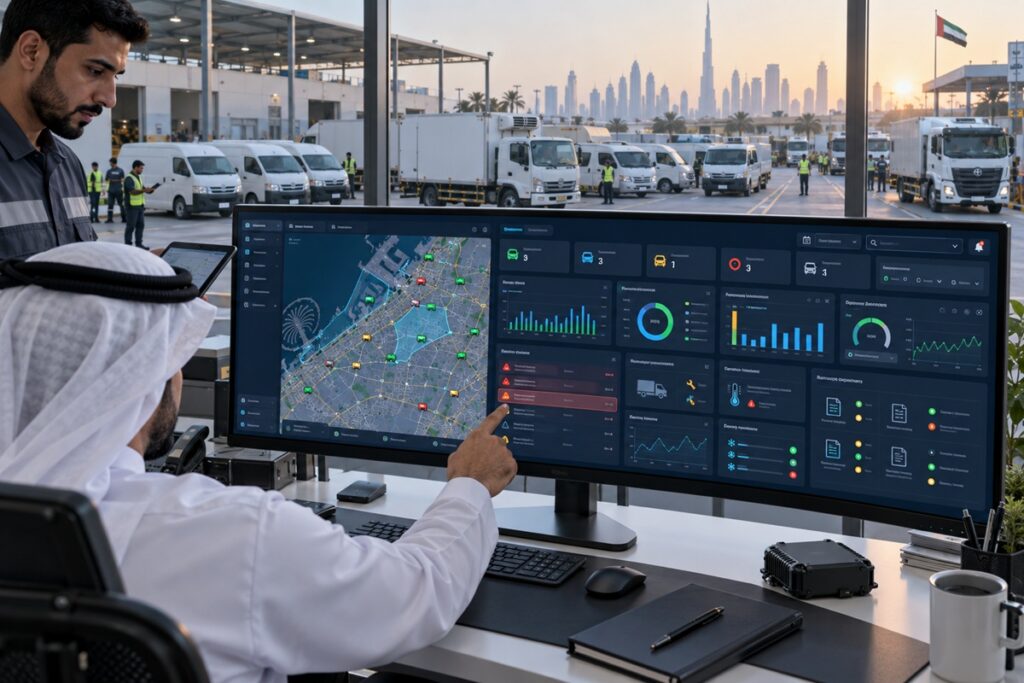
The fleet management dashboard is the first thing a UAE fleet manager should open every morning and the last thing they should review before leaving for the day. Done well, it answers the five operational questions that determine whether the day starts in control or in reactive mode: where are my vehicles, what happened overnight, which drivers need attention this week, what compliance items are approaching expiry, and is fuel spend tracking within budget?
Done poorly a dashboard cluttered with 40 widgets, every possible metric, and alerts from six separate systems it answers none of these questions efficiently because the signal is buried in noise. The difference between a useful fleet management dashboard and a useless one is not the volume of data it contains but the structure that presents the right information in the right order for the specific management decisions that need to be made each morning.
This guide defines the five panels that every UAE fleet manager’s dashboard should contain, the specific data elements within each panel, the daily review sequence that extracts maximum value in minimum time, and the alert prioritisation framework that ensures the most operationally significant events are actioned first.
Key Takeaways
- An effective fleet management dashboard has five panels: live map, alert queue, safety summary, compliance status, and fuel and cost snapshot. Each panel answers a specific operational question; together they provide complete fleet visibility in a single screen view.
- The daily dashboard review should follow a fixed sequence alerts first (action anything urgent before it compounds), compliance second (catch any expiry approaching within 7 days), safety summary third (identify coaching priorities for the week), live map fourth (dispatch decisions and route checks), fuel snapshot fifth (flag any cost anomalies for investigation). This sequence ensures that time-sensitive items are actioned first.
- Alert fatigue the tendency to ignore alerts when too many are generated is the most common fleet management dashboard failure. Alert configuration should be conservative enough that every alert generated is worth acting on; alert volumes above 20 per day for a 50-vehicle fleet indicate misconfigured thresholds that are generating noise rather than signal.
- UAE-specific dashboard requirements include: Asateel/IVMS submission status (green = all vehicles submitting data; amber = one or more vehicles with submission gap; red = compliance notice received), summer seasonal compliance panel (pre-summer cooling system and battery inspection status for July-August peak risk period), and Salik transaction summary (daily toll spend by vehicle for cost allocation).
- The fleet manager’s mobile app should display the same five panels as the web dashboard with push notification delivery for critical alerts that require immediate response regardless of whether the fleet manager has the app open. The mobile dashboard is not a reduced version of the web dashboard; it is the same dashboard optimised for a smaller screen.
The Five Essential Dashboard Panels
Panel 1 Live Fleet Map
The live map is the operational foundation of the fleet management dashboard it answers ‘where are my vehicles right now’ for every vehicle simultaneously without requiring any clicks. The UAE fleet manager’s live map should show:
- All vehicles as colour-coded markers: green = moving at normal speed, amber = stationary with engine on (idling), red = alert active, grey = ignition off
- Vehicle identity visible at each marker without hover or click registration number or vehicle nickname displayed directly on the map at the current zoom level
- Current speed and driver identity visible on single-click vehicle detail no navigation to a separate vehicle page required
- Geofence boundaries overlaid on the map depot perimeters, customer sites, restricted zones so geofence violations are visually obvious without requiring alert review
- Cluster view for dense vehicle concentrations when multiple vehicles are within a small area (depot at 6 AM, construction site), cluster to a number badge rather than overlapping markers
UAE-specific map configuration: the live map should default to the UAE + Oman view for fleets with cross-border operations zooming to UAE only misses vehicles in transit on the Muscat corridor. For Abu Dhabi-heavy fleets, the Western Region should be visible at the default zoom level so remote ADNOC site vehicles are not hidden at the edge of the map view.
Panel 2 Alert Queue
The alert queue is the fleet manager’s action list every unresolved alert from the past 24 hours, ranked by severity (critical first, then warning, then informational). The alert queue should show:
- Alert type, vehicle identity, driver identity, time, and GPS location for each alert all visible in the queue row without expanding the alert
- Alert age how long ago the alert fired so that alerts requiring immediate response are distinguished from alerts that have been open for 18 hours and are now non-urgent
- Action status unreviewed, acknowledged (seen but no action yet), actioned (follow-up action taken, pending resolution), resolved enabling the fleet manager to see at a glance which alerts still require attention
- Alert category filter the ability to filter by alert type (geofence exit, harsh event, OBD fault, fuel anomaly, card exception) so the fleet manager can triage by category rather than scrolling through a mixed list
Alert fatigue management: for a well-configured 50-vehicle UAE fleet, the daily alert queue should contain 5 to 15 alerts requiring review not 50 or 100. Alert volumes above this indicate threshold misconfiguration. Common UAE over-alert sources: idling alerts configured at 5 minutes (correct threshold is 10 minutes for UAE urban delivery to avoid constant queue-traffic alerts), speed alerts at fixed thresholds rather than speed-vs-posted-limit (generates constant alerts on highways where the posted limit is 120 km/h), and geofence alerts without operating-hour schedules (fires every time a vehicle returns to depot after hours when no alert is operationally useful).
Panel 3 Safety Summary
The safety summary panel gives the fleet manager the week’s driver performance picture in a single glance without needing to open the full driver scorecard report. The safety summary should show:
- Fleet-average safety score for the current week and the prior week trend direction (up or down) visible at a glance
- Bottom-quartile driver count the number of drivers scoring below 60/100 this week, with names visible on hover or click
- Top 3 harsh event categories for the fleet this week ‘Harsh braking: 47 events | Speeding: 23 events | Harsh acceleration: 38 events’ so the coaching focus for this week’s conversations is immediately clear
- Overnight idling highlight which vehicle accumulated the most A/C idling overnight and how much it cost the single highest-value idling coaching target for today
- Fatigue alert count total AI dashcam fatigue and distraction events for the fleet in the past 24 hours, with any events above 3 per driver highlighted for same-day driver contact
Panel 4 Compliance Status
The compliance status panel is the UAE fleet manager’s regulatory risk view showing all compliance documents approaching expiry and the Asateel/IVMS submission status in a single glance. For a UAE commercial fleet, compliance failures generate fines, site access suspension, and operating licence risk that make this panel operationally critical. The compliance panel should show:
- Documents expiring within 30 days: Mulkia (vehicle registration), comprehensive insurance, vehicle inspection certificate, driver licences listed by days remaining, soonest first
- Asateel submission status: green (all vehicles submitting successfully), amber (one or more vehicles with submission gap in the past 24 hours), red (compliance notice received from ITC immediate action required)
- ADNOC IVMS status (for contractor fleets): green/amber/red for each vehicle submitting to ADNOC portal
- Renewal action queue the specific renewal actions initiated, their status (in progress, completed, overdue), and the responsible party (PRO, fleet manager, HR department)
UAE-specific seasonal addition June through September: a pre-summer inspection status panel showing which vehicles have completed the mandatory pre-season cooling system and battery check, and which have not yet been scheduled. This seasonal panel is the proactive summer risk management view that prevents the July and August breakdown peak.
Panel 5 Fuel and Cost Snapshot
The fuel and cost snapshot gives the fleet manager yesterday’s fuel performance summary without requiring a full fuel report to be generated and reviewed. The snapshot should show:
- Yesterday’s fleet-average fuel cost per km vs baseline ‘+8%’ or ‘-3%’ tells the fleet manager immediately whether yesterday was normal or anomalous
- Top 3 vehicles by fuel cost per km yesterday the specific vehicles that drove above-baseline consumption yesterday, for same-day investigation
- Total fleet idling cost yesterday AED figure for all idling across the fleet, with the top idling vehicle named
- Card reconciliation exceptions open the count of fuel card transactions where vehicle GPS location did not match the card purchase location, awaiting fleet manager review
- Depot bulk tank level (where applicable) current stock level as a percentage of capacity, with low-stock alert if below reorder threshold
The Daily Dashboard Review Sequence
A fleet management dashboard that is opened and scanned randomly produces less management value than the same dashboard reviewed in a fixed sequence. The following 10-minute morning review sequence extracts maximum operational value from the five panels:
| Step | Panel | Time | Action | Escalation Trigger |
| 1 | Alert Queue | 2 min | Review all critical and warning alerts from the past 12 hours. Acknowledge alerts that are informational or already known. Flag any critical alert that has not been actioned vehicle OBD critical fault, after-hours geofence exit, card exception. | Any critical alert older than 2 hours without action → immediate follow-up |
| 2 | Compliance Status | 1.5 min | Check days-remaining on all documents in the 30-day window. Confirm any Asateel/IVMS submission status is green. Review renewal action queue for any items past their expected completion date. | Any document with less than 7 days remaining without active renewal → immediate escalation to PRO |
| 3 | Safety Summary | 2 min | Note fleet-average score vs prior week. Note bottom-quartile driver count. Record the top 3 harsh event categories for this week’s coaching conversations. Note the overnight idling highlight add to today’s coaching call list. | Bottom-quartile count above 15% of driver population → review coaching programme effectiveness |
| 4 | Live Map | 2 min | Confirm all vehicles are on expected routes for this time of morning. Check any vehicles showing amber (idling) status that should be moving. Verify overnight geofence alerts from the alert queue against current vehicle positions. | Vehicle on unexpected route or location → driver contact within 15 minutes |
| 5 | Fuel Snapshot | 1.5 min | Note yesterday’s fleet CPK vs baseline. Flag top 3 above-baseline vehicles for investigation today. Review card reconciliation exception count any above 3 for the day requires review of specific transactions. | Top-vehicle CPK more than 20% above baseline → OBD fault check + driver contact |
Dashboard Configuration for UAE Fleet Conditions
A fleet management dashboard configured for European fleet conditions will generate noise and miss signals in UAE operations. Three UAE-specific configuration adjustments improve dashboard signal quality:
Summer vs Winter Alert Thresholds
UAE summer heat affects both vehicle behaviour and driver behaviour in ways that change the appropriate alert thresholds. Fuel consumption alert thresholds should be increased by 10 to 15 percent from June through September a vehicle consuming 12 L/100 km in winter is performing normally; the same vehicle at 13.5 L/100 km in August is within expected summer range, not a genuine anomaly. Idling alert thresholds for A/C idling during breaks should account for the legitimate 10-minute cooling period before engine-off that the UAE summer fleet policy permits. Tyre pressure TPMS alerts should be configured with UAE summer running pressure thresholds (cold specification plus 12 to 15 PSI maximum) rather than European cold-inflation-only thresholds that generate constant alerts during summer operation.
Cross-Border and Remote Route Dashboard Visibility
UAE fleet managers with GCC cross-border operations need the dashboard to show vehicles in Oman and Saudi Arabia with the same visibility as UAE vehicles not as offline or out-of-coverage items. Configure the live map to display UAE, Oman, and Saudi Arabia simultaneously at the default zoom level. For vehicles on remote Western Region routes where cellular coverage gaps cause store-and-forward data buffering, configure the dashboard to show the last known position with a ‘data delayed’ indicator rather than treating the vehicle as offline the last known position is still operationally useful for dispatch management even when the data is 30 minutes old rather than 30 seconds old.
UAE Compliance Alert Integration
The compliance panel should integrate with UAE-specific compliance programmes that standard fleet management dashboards do not include as default. Asateel submission monitoring should show the specific ITC portal confirmation status not just whether the GPS device is transmitting, but whether the ITC portal has confirmed receipt. ADNOC IVMS journey management pre-trip inspection status should appear in the compliance panel for ADNOC contractor fleets if a vehicle has departed without completing the digital pre-trip inspection, the compliance panel flags this as a journey management violation before the vehicle reaches the ADNOC facility gate. Mulkia expiry alerts should fire at 30 days, 14 days, and 7 days the three-tier alert structure gives the fleet manager three opportunities to initiate renewal before the document lapses.
Role-Based Dashboard Views
Not every person with fleet management platform access needs to see the same dashboard. Role-based dashboard views showing each user only the data relevant to their management responsibility improve both usability and data security:
| Role | Dashboard View | Key Panels | Data Scope |
| Fleet Manager (national) | Full five-panel dashboard | All five panels with full fleet visibility | All vehicles, all drivers, all cost centres |
| Depot Supervisor | Depot-scoped dashboard | Live map (depot vehicles only), alert queue (depot alerts), safety summary (depot drivers) | Vehicles and drivers assigned to their depot |
| Safety Officer | Safety-focused dashboard | Safety summary (full fleet), alert queue (safety events only), AI dashcam events | All vehicles and drivers safety data only, no cost data |
| Finance Manager | Cost dashboard | Fuel and cost snapshot, budget variance summary, ERP cost allocation status | All vehicles cost data only, no driver behaviour data |
| Driver (self-view) | Own performance app view | Own safety score, own trip history, own fuel efficiency score, leaderboard position | Own data only no other driver or fleet-wide data |
| Senior Management | Executive summary dashboard | Fleet-level KPI summary: total cost, fleet safety score, compliance status, budget position | Aggregated fleet metrics no individual vehicle or driver detail |
VZone International Fleet Visibility Software Five-Panel Dashboard for UAE Fleet Managers
VZone International’s Wialon fleet management platform delivers the five-panel fleet visibility dashboard: live map with real-time vehicle positions, alert queue with UAE-specific alert types, driver safety summary with weekly scorecard, compliance status with Asateel/IVMS monitoring, and fuel and cost snapshot with card reconciliation. Role-based views for managers, supervisors, drivers, and finance. Arabic and English interface. Mobile push notifications for critical alerts. Contact our team for a dashboard demo for your UAE fleet.
Frequently Asked Questions
A fleet management dashboard should show five panels that together provide complete operational visibility: a live fleet map (real-time vehicle positions, speeds, driver identities, and status), an alert queue (unresolved alerts from the past 24 hours ranked by severity), a safety summary (fleet-average safety score, bottom-quartile driver count, top harsh event categories), a compliance status panel (documents expiring within 30 days, Asateel/IVMS submission status), and a fuel and cost snapshot (yesterday's fuel cost per km vs baseline, top above-baseline vehicles, card reconciliation exceptions). Together these five panels answer the five operational questions that determine whether a UAE fleet manager starts the day in control: where are my vehicles, what happened overnight, which drivers need attention, what compliance items are approaching, and is fuel spend on track.
UAE fleet managers should follow a three-frequency dashboard review cadence. Morning review (daily, 8 to 12 minutes): the five-panel sequence described in this guide alerts, compliance, safety, live map, fuel snapshot before the operational day begins. During-day monitoring: push notification alerts on mobile for critical events (critical OBD fault, after-hours geofence exit, card reconciliation exception above threshold) that require same-day response the dashboard is not continuously open, but alerts push to the mobile app. End-of-day review (daily, 5 minutes): confirm all outstanding alerts have been actioned or acknowledged, check compliance renewal progress on any items in the 7-day window, note any vehicles that had notable events during the day for tomorrow's coaching conversations. Weekly review (30 to 45 minutes Monday morning): full KPI scorecard review covering the week's safety scores, maintenance status, fuel performance, and compliance position this is the management decision review rather than the operational monitoring review.
Fleet visibility software is a platform that provides real-time and historical data visibility across all aspects of a commercial fleet vehicle locations, driver behaviour, vehicle condition, fuel consumption, maintenance status, and compliance position in a unified dashboard accessible to fleet managers, supervisors, drivers, and stakeholders through web browsers and mobile apps. The term 'fleet visibility' distinguishes platforms that provide comprehensive operational visibility across all management domains from basic GPS tracking tools that provide only location data. VZone International's Wialon platform is fleet visibility software for UAE commercial fleets combining GPS tracking, OBD diagnostics, AI driver scoring, fuel monitoring, compliance management, and maintenance scheduling in a single dashboard that gives fleet managers the complete operational view they need to manage proactively rather than reactively.
Setting up a fleet management dashboard for UAE operations involves five configuration steps. First, establish the UAE-calibrated alert thresholds idling alert at 10 minutes (not 5), speed alerts using posted-limit comparison rather than fixed thresholds, summer fuel consumption baselines with 10 to 15 percent seasonal adjustment. Second, configure the compliance panel with UAE-specific programmes Asateel submission monitoring, Mulkia 30/14/7-day expiry alerts, ADNOC IVMS status, SIRA or SecurePath if applicable to the fleet's vehicle categories. Third, set up role-based dashboard views fleet manager full view, depot supervisor scoped view, safety officer safety-focused view, finance team cost dashboard. Fourth, configure the mobile app for push notification delivery of critical alerts after-hours geofence, critical OBD faults, card reconciliation exceptions so the fleet manager receives urgent alerts on mobile regardless of dashboard login status. Fifth, run the daily review sequence for two weeks to calibrate alert volumes if any alert category is generating more than 3 to 5 alerts per day on a 50-vehicle fleet, the threshold needs adjustment. VZone International configures all five steps during the fleet management platform onboarding process.